April 28, 2017

SITUS RESMI TELKOMSEL TELAH DI RETAS

Situs Telkomsel Kena Hack, Netizen Justru Mendukung Hacker


Kabar mengenai situs telkomsel yang di hack memang benar adanya. Hal ini juga didukung dari banyaknya postingan netizen di media sosial. Dan gambar diatas adalah screenshoot ketika situs telkomsel baru saja diretas, kini situs telkomsel sedang dalam perbaikan dan tidak lagi menampilkan kalimat seperti foto diatas.
Ada yang mengatakan bahwa hal tersebut adalah tindakan bodoh yang dilakukan seseorang karena tidak mampu membeli kuota internet, ada pula yang justru mendukung karena menganggap harga paket internet telkomsel terlalu mahal.
menyikapi website telkomsel yang sempat diretas, para pengguna media sosial melontarkan kritikan kepada telkomsel melalui postingan- postingan di media sosial seperti berikut ini.
1. Ada yang tertawa puas karena aspirasinya telah diwakilkan.
“This is EPIC! HAHAHA…one angry customer with millions impact. Eat that! @Telkomsel” tulis @WRahMada
2. Kasus ini menjadi perwakilan suara banyak pelanggan telkomsel yang mengeluh karena harga tinggi.
“Ya semacem perwakilan suara dari kami yg ngeluh atas harga paket Telkomsel yg mahal” tulis @dhimasdee.
3. Banyak yang meminta agar telkomsel menurunkan harga.
“Mana orang @Telkomsel diginiin diem ajah, apa setuju turunin harga. Aseek @MenKoInfo” tulis @mahmurr.
4. Ada benernya juga ya?
“Hmmm… Ada benernya juga pesan ini.. Harganya kemahalan Pak-Bu, yg lain betani lebih murah.. @Telkomsel” tulis @Mukti_Ali.
5. Salut pada hacker
“Siapapun dia, Wahai orang yang nge-hack Telkomsel.. Aku salut padamu” tulis @bambangelf.
6. Dari orang – orang yang pulsanya habis tersedot.
“Untuk Hacker Telkomsel Congratulations Dari kami yg pulsanya abis kesedot gara2 kuota abis” tulis @jonathanend.
7. Kena hack ya min?
“@Telkomsel kena hack ya min? Mahal2 biaya internet nya tapi msh kena hack…” tulis @Semi_devil
8. Suara konsumen akhirnya tersampaikan
“Jejak dgital pahlawan hack, meski web telkomsel sudah up. Protes suara konsumen tersampaikan” tulis @BungJer. 

March 20, 2017

HERE'S HOW TO RESTORE AFFECTED INSTAGRAM ACCOUNT HACK

HOW HIS EASY AND HARD

As social media really booming right now, Instagram is a soft nest for the hack er. Gak deh counted how many Instagram account that was hacked alias burglarized. Starting from the artist to the class selebgram or people who are quite influential in Instagram account must have been in collapse alias in the same hack the hack er destinations.
Most people would immediately confused and panicked when his Instagram account has been hacked. Though yes, there is an easy and simple way that you can do to restore the account was hacked. Gini you know how!
Ps. The following step is performed via Instagram website.

1. Open help.instagram.com and select "Privacy & Safety".

So, if your Instagram account to hack then do not hesitate to ask for help via help.instagram.com menu and select Privacy & Safety> Report Something> Hacked Account> I Think my account has been hacked> Report it to us.
After that, there will be some questions that come up and you need to fill it properly and clearly.

2. Just as the first step, but select menu "Impersonation Account".

The steps are almost the same why as above, just select the menu Impersonation Account to report that your account was taken over at the other. Keep in mind, to report that your account is hacked use this way then you must fill out a form that has been provided Instagram with full email you use to sign up early to Instagram.
Also, make sure Instagrammu account has now been renamed or not. If renamed, then you're required to enter your account name is now used in order for the Instagram could easily help restore it.

3. If you have successfully reported, then the Instagram account of yours will be lost!

No need to panic, it is a step on the part of Instagram to ensure that there is a burglary action against your account. You are not going to look for your account name in the search field, and when you type the name of your account will appear "user not found".
Remember, when your account name can not be found do not try to register again on Instagram with the same account names. You see, it can even make the Instagram confused and even make you seemed to be those who hacked her account.

4. Do not be bored check email!

Post report, check your email deh. What message from Instagram related parties report. If there is incoming mail from Instagram related steps you need to do regarding the return of your account, then immediately follow.
Typically, the Instagram will ask you to do the following instructions: hand writing the account name and the full name and secret code of Instagram in the white paper. Then picture your face and the white paper to verify that you are indeed the original owner of the account.
Try either the position or face accordance with one of the photos that you've uploaded on Instagram, or at least similar to your profile photo.

5. Instagram will also send emails related to the form you need to fill in (again) to restore your account!

So, after sending a reply email regarding data verification and then the Instagram yourself once again will send you the forms that need to be filled with personal data, especially image or copy of ID. Reply email and fill this one with clearly ya guys! Do not get any important information or the form fields are not filled.

6. If you've done the steps above, please be patient waiting for a reply parties Instagram.

Yes, usually about 4 to 7 days the new Instagram will reciprocate and return the account is yours again. The sign that your account has been re-mu is the emergence username in the Search field.
Follow the recovery of your account in accordance with the last reply email from the Instagram and you're good to go back to using your Instagram account again.
How guys, easy huh? Although the process is a bit long but worth it anyway to restore the Instagram account of yours again! Try it once practiced when most hack your account.

INILAH CARA MENGEMBALIKAN AKUN INSTAGRAM YANG TERKENA HACK

CARA NYA GAMPANG DAN TIDAK SUSAH

Sebagai media sosial yang lagi booming banget sekarang, Instagram adalah sarang empuk buat hacker. Gak terhitung deh berapa akun Instagram yang sempat di hack alias dibobol. Mulai dari artis sampai kelas selebgram atau orang yang cukup punya pengaruh di Instagram pasti pernah di bobol akunnya alias di hack sama para hacker dengan berbagai tujuan.
Kebanyakan orang pasti langsung bingung dan panik kalau akun Instagram-nya sudah di hack. Padahal ya, ada cara mudah dan sederhana yang bisa kamu lakukan untuk mengembalikan akun yang sempat di hack. Gini lho caranya!
Ps. Langkah berikut ini dilakukan via Instagram website.

1. Buka help.instagram.com lalu pilih "Privacy & Safety".

Jadi, kalau akun Instagram-mu ke hack maka jangan ragu untuk meminta bantuan via help.instagram.com lalu pilih menu Privacy & Safety > Report Something > Hacked Account > I Think my account has been hacked > Report it to us.
Setelah itu, akan ada beberapa pertanyaan yang muncul dan kamu perlu mengisinya dengan benar dan sejelas-jelasnya.

2. Sama seperti langkah pertama, tapi pilih menu "Impersonation Account".

Langkah-langkahnya hampir sama kok seperti di atas, hanya saja pilih menu Impersonation Account untuk melaporkan bahwa akunmu diambil alih sama orang lain. Perlu diingat, untuk melaporkan akunmu yang kena hack pakai cara ini maka kamu wajib mengisi form yang sudah disediakan Instagram dengan email lengkap yang kamu gunakan untuk mendaftar awal ke Instagram.
Selain itu, pastikan sekarang akun Instagrammu sudah berganti nama atau tidak. Kalau berganti nama, maka kamu wajib memasukkan nama yang sekarang digunakan akunmu agar pihak Instagram bisa dengan mudah membantu mengembalikannya.

3. Jika sudah berhasil lapor, maka akun Instagram-mu akan hilang!

Gak usah panik, itu memang langkah dari pihak Instagram untuk memastikan bahwa memang ada tindakan pembobolan terhadap akunmu. Kamu gak bakal bisa mencari nama akunmu di kolom pencarian dan saat kamu mengetik nama akunmu maka akan muncul "user not found".
Ingat, saat nama akunmu gak bisa ditemukan jangan coba-coba mendaftar lagi di Instagram dengan nama akun yang sama. Soalnya, itu malah bisa bikin pihak Instagram bingung dan malah bikin kamu seakan-akan jadi pihak yang meng-hack akunmu.

4. Jangan bosan cek email!

Pasca laporan, cek deh emailmu. Apa ada pesan masuk dari pihak Instagram terkait laporanmu. Kalau memang ada email masuk dari Instagram terkait langkah yang perlu kamu lakukan terkait pengembalian akunmu, maka segera ikuti.
Biasanya, pihak Instagram akan meminta kamu untuk melakukan instruksi sebagai berikut: tulis tangan nama akun dan nama lengkap serta kode rahasia dari Instagram di kertas putih. Kemudian foto wajahmu dan kertas putih itu untuk memverifikasi bahwa kamu memang pemilik asli akun.
Usahakan, baik posisi atau wajah sesuai dengan salah satu foto yang pernah kamu upload di Instagram atau minimal mirip dengan foto profilmu.

5. Instagram juga akan mengirim email terkait form yang perlu kamu isi (lagi) untuk mengembalikan akunmu!

Jadi, setelah mengirim balasan email terkait verifikasi data dan dirimu maka pihak Instagram sekali lagi akan mengirimimu dengan form yang perlu diisi dengan data diri terutama foto atau copy ID. Balas dan isi email satu ini dengan sejelas-jelasnya ya guys! Jangan sampai ada informasi penting atau kolom isian yang gak terisi.

6. Jika sudah melakukan langkah-langkah di atas, bersabarlah menunggu balasan pihak Instagram.

Ya, biasanya sekitar 4 sampai 7 hari pihak Instagram baru akan membalas dan mengembalikan akun jadi milikmu lagi. Tandanya kalau akunmu sudah kembali adalah munculnya username-mu di kolom Pencarian.
Ikuti langkah pemulihan akunmu sesuai dengan email balasan terakhir dari pihak Instagram dan kamu pun sudah siap kembali menggunakan akun Instagram-mu lagi.
Gimana guys, mudah banget kan? Meski prosesnya agak lama tapi worth it kok untuk mengembalikan akun Instagram-mu lagi! Coba deh dipraktikkan kala suatu kali akunmu ter-hack.

August 5, 2016

How to Overcome the "camera fail" on the ALL Android Samsung

How to Overcome the "camera fail" on the Samsung Galaxy


Ngepost ah, about a little problem on a smartphone, let kesekarangan. ? S never again ngepost blog. Previously, I want to tell ya overbearing bentar first fifty minutes, just listen. All around me, I often rely on to solve the problems that befall those relating to technology, laptop kah, desktop kah, printer kah, and smartphones kah, though I'm not a handyman service, only the master wrote, haha, plis deh. I am sure I am not alone, many are in the same boat. Yesterday aja (tuh now deem wrote today), in one day there are friends and neighbors and Sodara ngasihin his smartphone for my fix and modification. There is a request dibenerin camera (this Sodara me), there is a request cusrom, there is a request in flash because softbrick, there is a request for money (this beggar), I just arrogant deh. I laugh. Whereas ya ya, they stayed nyari in google ways to address the problems that are befalling them. Now that he, they ngulik lazy, arrogant anymore right now I, I ngulik artisan. Already yes directly to the theme, already fifty-three minutes of this. So I choose to share the problems afflicting Sodara I wrote because it was simple.
Initially I do not know, da new find any problems like this, yes I try ways that are published by people who ngepost search I typed with Indonesian. Looks complicated indeed for Sodara me that lazy nyoba-nyoba, yes I have tried, the first experiment setup, menager applications, tabs all, search for the camera, the forced stop (slowly ya), delete the data, delete memory, restart dd, Ms. failed. the second way I tried, his hh dimatiin, press vol up-menu-power together, select wipe cache partition and wait until complete, and reboot system now, failed again mas. Nyoba remove the SD card is still in vain. I aral (desperate and emotional) I finally got into a three-way, reset to a setting factory, important files on the internal backed up to an external first, just like the latter but select her wipe data / factory reset, until this phase is completed, all change settings like new and still cameras can not be used, failed again kang, shucks right. Eh typing-typing, shucks in the Sunda koko know, quick info in the news world. Cont. Initially "broken camera" now become "camera failed". Opposite yes, in life usually largely failed first yes, the new order, but this camera man, and can not be used. I added aral (already understand yes, the Sundanese language, ex: "Aing Geus aral").
Finally a fourth way, the way that I always travel after stuck at home, I try to overseas, at this link I found pencerahdipagiharian. Yeah I ngagubrag, because of its easy, sesimple it. So it turns out how to fix the camera problematic in smartphones, particularly in the Galaxy Grand Prime Duos (has Sodara me), do not need to bother to factory data is reset, live in detached wrote batrenya while trus pasangin it, it's just like that, turn on again, taraaaaa, budimaaaan, uh, finally the camera can jepretkan again.
So the way this fourth jadiin first way yes for stricken, not a third way that is in jadiin the first, pity will fear my rich flailing because aral (already not have to use parentheses yes), now eating I write here let you I say thank you and more arrogant, haha, dont deng, I'm joking, I'm serious.
20151208_050512mini
galaxy_grand_prime
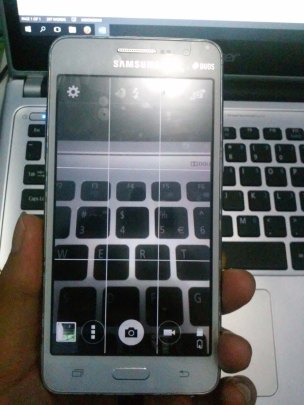
Sorry not nyertain image when the camera torpor and the steps each way, (apology does not apply to the fourth way). I wrote this liatin result of my own green Sodara camera back after reforestation. Well equally.
So umpteen to post Ciliwung, (oops typo), this time on the camera fails to address the issue that should be no problem.Salam leuleupeutan.

TOPOLOGI JARINGAN DAN PERANGKAT JARINGAN BESERTA KELEBIHAN DAN KEKURANGAN NYA

TOPOLOGI JARINGAN DAN PERANGKAT JARINGAN BESERTA KELEBIHAN DAN KEKURANGAN NYA A. TOPOLOGI JARINGAN ( KELEBIHAN DAN K...